Turning Digital Receipts into a Product Feature
Redesigning the post-purchase experience to eliminate paper receipts while increasing customer value
A UX design case study exploring how a cost-saving initiative became a product opportunity.
An grocery shopping e-commerce was spending a significant amount every year printing paper receipts for customers. The business case for going digital was straightforward: stop printing, save money. The constraint was doing it without creating friction.
Research showed that over 90% of customers were actively using the paper receipt: 58% reviewed it for budgeting, and 33% kept it for tax purposes. Only 9% didn't look at it at all. That told me the digital receipt couldn't just be a PDF equivalent.
The more interesting question was whether the transition could improve the user experience rather than just preserve it.
If the digital receipt supported reordering, budgeting and tax management, customers would not only tolerate the switch but prefer it.
I ran a prioritisation matrix across four KPIs to decide where to focus: supporting the paper switch-off, making substitutions and refunds clearer, keeping refunds accessible without promoting them, and driving conversion to the next order. These became the guardrails for the MVP.
The MVP covered six core capabilities: receipt history, substitution visibility, add-to-trolley shortcut, sharing and export options, refund/replace/return flow, and monthly expense calculation.
The reorder flow was the most product-critical. Customers could open any past receipt and add the full order directly to their trolley, turning the receipt into a shopping tool. Monthly expense calculation gave customers a running total across all orders, addressing the budgeting use case that was driving most paper receipt reviews.
I tested the flows using a Marvel prototype across three tasks:
- Reorder from last week's receipt: validated the add-to-trolley shortcut
- Forward receipt by email for tax: validated the sharing and export flow
- Refund a broken item: validated the refund entry point from within the receipt
Completion rates were solid across all three. The one thing that didn't land first time was substitution visibility. Customers were missing the flag entirely in the first design, so I moved it higher in the receipt hierarchy and made it more visually distinct.
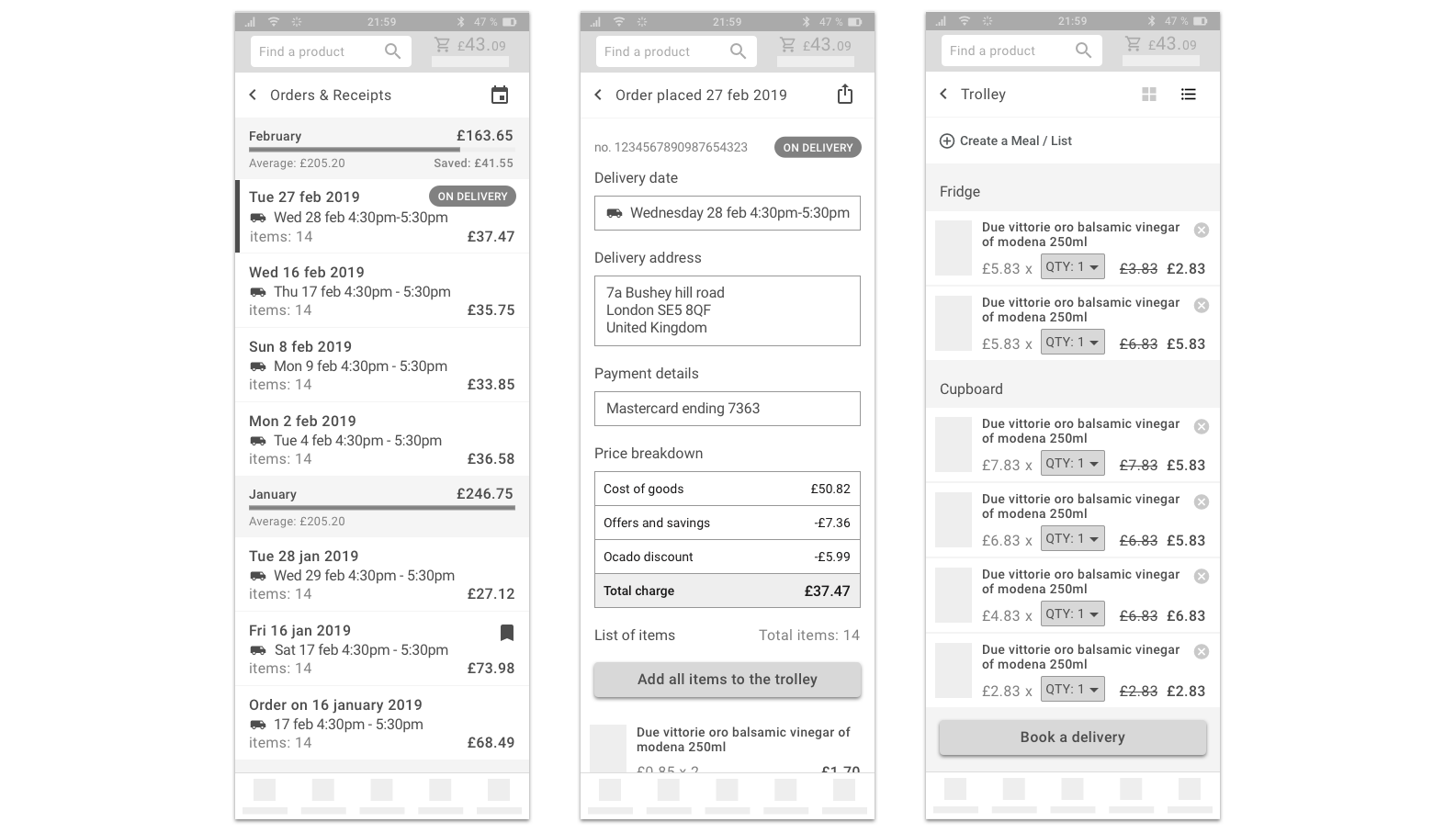
The redesigned digital receipt addressed the paper switch-off without asking customers to give something up. It gave them a better version of what they already had, plus capabilities the paper receipt couldn't offer.
The business case stacked up on both sides: cost reduction from eliminating printing, and potential revenue uplift from reorder conversion.
I leaned too hard on a single persona as my design anchor. In practice the tax use case skewed toward self-employed customers and the reorder use case skewed toward customers with very predictable shopping habits. Not the same person. I'd segment earlier and design more explicitly for each job, rather than trying to serve them all through one flow.